
SQL Server Transactional Replication Part 2, Setup and Initialization Complications
This is part 2 in a series on SQL Server transactional replication. Read Part 1, Introduction and Basics if necessary.
You’ve examined all the options and have decided that Microsoft SQL Server transactional replication is the solution to your problem. Congratulations! Also, my condolences. While transactional replication is a very versatile tool, that versatility comes with a lot of complications, which can lead to new and exciting expletives. Be careful that you’re not in a “hot mic” situation when you’re trying out those new expletives.
Once you’ve decided on your topology and created your publication, you’ll be prompted to make a decision about the snapshot. At least, you will think it’s about the snapshot. It’s really so much more, and if you answer wrong here you may be in for a world of pain later.
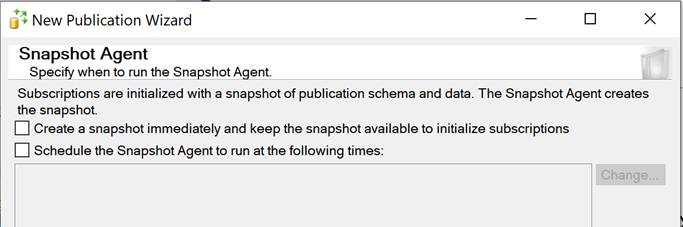
There are two checkboxes in this dialogue. Both seem reasonable. Why wouldn’t you want to create the snapshot immediately and keep it ready for your subscriber? Why wouldn’t you want to add a schedule to this process? To explain why you might not want to do this, you need to understand the initialization process.
Initialization
Initialization via a snapshot from the snapshot agent is the most common way to set up a subscriber. A marker is placed in the transaction log on the publisher database, so the log reader agent knows the starting point, and all of the data from the articles is exported out to flat files. The distribution agent sends that data over to the subscriber and begins keeping it in sync from that point with data that the log reader agent puts into the distribution database. It sounds simple, but there are a few extra things going on under the covers.
Expletive #1: The S-word (Snapshot)
The first pain point is locking and blocking. In order for the snapshot to be taken, the snapshot agent has to get a consistent picture of all of the articles at a specific point. To do that, it briefly locks all of the articles with an exclusive lock just long enough (typically a few seconds, longer if you have hundreds of articles) to capture the schema definition of each one. That lock, however, has to follow all the normal rules for locking in SQL Server, which means that if other processes have locks on the table, the snapshot agent has to wait patiently for them to resolve before its request will be granted. Because it is an exclusive lock, though, any processes that begin after the snapshot agent makes it request are blocked by the exclusive lock request. This can cause major problems if you try to run a snapshot during the middle of the day, or if you were to schedule it to run at regular intervals, as in the prompts above.
Expletive #2: The D-word (Distribution Database)
The second pain point can be the distribution database. This pain won’t reveal itself right away; it typically takes time in days, weeks or sometimes months. The replication delivery process will begin to get sluggish. The distribution database will continue to grow in size. More and more resources will be required to keep replication running smoothly. This happens because the other option, “keep the snapshot available to initialize subscriptions,” was checked.
When this option (called “Immediate Sync” in the publication options) is selected, the distribution database must maintain a record of all transactions since the last snapshot was taken, so that you can immediately synchronize a new subscriber without needing a new snapshot. If you only make a few dozen changes per day, this may never become a problem. But if you make thousands or millions, it’s going to get painful pretty quickly. It’s a nice idea that goes horribly wrong when misunderstood.
Very few environments are onboarding new replication subscribers in a way that makes using this option desirable. It means you must take regular snapshots (hopefully there is a low-usage time when the blocking won’t have an impact) so that the distribution database doesn’t become bloated with data.
Expletive #3: Combination D-word and C-word (Drop and Create)
By default, your snapshot is going to contain commands that initiate a drop and create of the article on the subscriber. This is so that replication is really sure that the schema and definition of the article match between the publisher and the subscriber. This can cause problems, though, if you use your subscriber for reporting and have created schema-bound objects, like indexed views that reference replicated articles, on the subscriber. The drop action will fail and your snapshot will remain undelivered, preventing replication from getting started. Typically these types of issues only arise when a subscriber needs to be re-initialized sometime after initial synchronization. This happens sometimes because of issues with the publisher/distributor/subscriber connection that last too long, data corruption at the subscriber, server migration, etc.
How To Fix a Bad Choice or a Bad Situation With Snapshots
If you need to correct one of these issues after the fact, there’s good news: it’s often simple.
If you have scheduled the snapshot agent to run on a regular schedule, it’s pretty simple. Remember that the snapshot agent is managed as a SQL agent job. Find the job, remove the schedule, and poof, problem solved.
If you’ve set “Immediate Sync” you will need to use the stored procedure sp_changepublication as follows on your publication database:
EXEC sp_changepublication
@publication = ‘your publication name’,
@property = N’allow anoynmous’,
@value = ‘false’;
EXEC sp_changepublication
@publication = ‘your publication name’,
@property = N’immediate sync’,
@value = ‘false’
Checking the box to “keep the snapshot available to initialize subscriptions” will automatically also allow anonymous subscriptions, which is a topic for another time. To disable the immediate synchronization option, we have to disable the ability for anonymous subscribers to request data from our publication.
Once you have done this, the distribution cleanup process will begin removing data from the distribution database after it verifies synchronization with your subscribers. Be aware that this process is slow and it’s slow for a reason. It is trying to avoid overwhelming your system with cleanup activity when the focus should be on maintaining low replication latency and transactional consistency.
One the cleanup process is done running, you should see resource usage, performance and latency begin to return to normal levels. You can then shrink your distribution database data files to something reasonable and allow autogrowth to establish your equilibrium size.
If you have object dependencies preventing the drop/create operations form working, you have a few options to resolve that issue, depending on the type of dependency:
- If your dependency is a foreign key relationship:
- You can set the article option to use delete instead of drop/create. This will not ensure schema consistency, though, so make sure the article on the publisher is just like the one on the subscriber.
- You can script out the foreign key as drop/create and run the drop portion before re-initializing and the create portion once the snapshot has been delivered.
- If your dependency is a schema-bound object like an indexed view:
- Script it as drop/create, drop it prior to re-initializing and then re-create it once the snapshot has delivered.
SQL Tailor Consulting

If you’re in a sticky situation with transactional replication and you can’t resolve it, we’re here to help! Over more than 20 years of managing SQL Server databases, we’ve solved quite a few conundrums. Contact us today for a free consultation.


